}
Showing posts with label Apple. Show all posts

Tuesday, February 20, 2024

The day a big change arrived

I share all sorts of anniversaries, so why not a, what? Macaversary? Three years ago this week, my new Apple Mac Mini was delivered. You can thank Facebook for reminding me, and it’s a happy memory, so why not reflect in it?

I still love my Mac Mini, though had I known the Mac Studio was coming, I’d have waited for that. Be that as it may…

Three years ago today, when I wrote about my new Mac on Facebook, I talked about buying the Mac Mini and said I’d never ordered anything directly from Apple, and that was true, and what I was thinking about at the time, probably because the whole things was my idea and I was excited about it.

However, back in 2008, Nigel bought us both iMacs, with the biggest screens available at the time. He ordered them directly from Apple, and they arrived similarly quickly. Nigel then added more memory chips to both computers, because that was back when Apple allowed that. Modern Apple Silicon Macs (like my Mac Mini) use integrated memory that’s part of the CPU, and so, can no longer be upgraded.

Getting that iMac brought about my return to the Apple ecosystem: I’d been a Mac user from its very early days right up until around the turn of the century when Macs got even more too expensive than they already were, and Nigel built me my first-ever Windows PC. However, despite using a PC professionally for the better part of a decade, I still never understood Windows the way I understood Mac.

In my blog post on the new Mac, written on February 19, the day it actually arrived, I talked in some detail, as I do, about why I bought the machine, specifically, the issues I had with my Hackintosh. However, just shy of three weeks later, I fixed that problem, which basically meant I didn’t need the Mac Mini at that moment, though I obviously didn’t know that when I ordered the new machine. If I had known, I’d probably—possibly?—have held off longer, and may well have bought the higher-spec Mac Studio instead.

However, I certainly don’t regret buying it: It’s been a great computer for me, and it’s dramatically quieter than my Hackintosh was, which is a bonus. Even so, from time to time consumerist me thinks of upgrading, but I have no need to so, and sense triumphs over desire—for now.

After the Mac Mini arrived, I said that I felt that whatever my new life would be, it was somehow centred on my office, and my Mac in particular. I later went through a particularly dark time in which that new life seemed farther away than ever, but the feeling of possibility has since returned, which I’m happy about. I can again also see more clearly what I need to do to get to that new life I caught a glimpse of only a few short years ago.

Now, I just need to make my vision reality. “Macaversary’ or not, that’s a very worthwhile thing to focus on.

Wednesday, November 29, 2023

Keyboard error, here and gone

Typing on a device isn’t easy for a lot of us digital immigrants: Unlike those who grew up with smart devices (phones and tablets), some of us have a bit of trouble or awkwardness using the virtual keyboards on those devices. Sometimes, the device manufacturer can make matters worse. That happened to me, until one day it was gone.

I’ve used the “New Zealand English” keyboard on my iPhone and iPad for many years now, chiefly so I can get the macrons used in most versions of written Māori (for example, in the word "Māori" the “a” has a macron). I pretty obviously like to try to type Māori words correctly, and those keyboards made that possible.

As a bonus, those same keyboards allowed all sorts of other character modifiers used in various European languages, such as, umlauts in German (like in the word “grün”, which means green in English). I have the same sort of commitment to try to to type vowels correctly in all the non-English European languages I use from time to time (in non-English European languages, it’s most likely to be for a proper name).

After some upgrade or other, I noticed that the “New Zealand English” keyboard on my iPad no longer had anything but regular letters and macrons—there were no other character modifiers. I noticed this because I was leaving a Facebook comment and needed an umlaut (for a name), only to discover they were gone.

After some fruitless research, I ended up adding a German keyboard to my iPad, which gave me umlauts again. Unfortunately, that added new problems and frustrations.

In the screenshot avive, the NZ English keyboard is at top, and the German version is below. I toggled between the keyboards by tapping the globe symbol in the bottom row (second key from the left edge). However, that was also how I accessed emojis, something I use a lot in Facebook comments, private messages, texts, etc. It turns out that it was easy to accidentally switch to German and then be faced with a different keyboard layout (apparently called QWERTZ instead of the English QWERTY, and for the same reason). Sometimes I wasn’t even aware I’d accidentally bumped the globe key, so intent was I on what I was writing. Sometimes I also got into a weird loop trying to get an emoji or back to English. I was exasperated enough that I decided to (eventually) delete the German keyboard.

Then, everything changed.

Apple released another update to the operating system for my iPad, and I—eventually—noticed that the New Zealand English keyboard once again had all the special characters that had been missing. I then deleted the German keyboard, and my switching between letters and emojis was once again a peaceful endeavour.

The not noticing thing is a repeating reality, so I don’t know if my iPhone keyboard was similarly afflicted, though I presume it was. I generally only use that keyboard for texting because it’s so small and my fingers aren’t. I also never installed the German keyboard in my phone because I rarely, if ever, needed anything beyond macrons.

The story is even more complicated on my desktop Mac, and another reason I didn’t notice the difference on the iPad.

On my Mac, I use "Australian English" as my “input source” (which is mainly about keyboard configuration, though it apparently helps with spelling/autocorrect; there is no NZ English keyboard). That keyboard has all the European characters—but no macrons. For that, I have a second keyboard—called “Māori”—that has macrons, but no European special characters. Most of the time I have the keyboard set to Māori, which is usually all I need. When I need an umlaut or whatever, I use my mouse and toggle to the Australian keyboard, then back to Māori (there's probably a keyboard shortcut to toggle between the two keyboards, but I've never looked into it; it's highly improbable I'd remember it). When I noticed the change on the iPad keyboard, I just assumed Apple was standardising keyboards between mobile devices and Macs.

At any rate, I'm glad it's once again simple to type whatever non-English character I need, and to only have to use one keyboard to do it. It'd be nice if Apple did something similar with the Mac, but toggling keyboards on my Mac isn't even nearly as annoying as it was on the iPad.

Sometimes it's the smallest things that can make the biggest difference. I just never would've expected a virtual keyboard on a tablet would prove the point.

Wednesday, September 06, 2023

My modern mornings

Every morning, I sit down with my first cup of coffee and pick up my iPad to catch up on the news and Facebook. Then, I stop when it’s time for breakfast and morning ablutions.

Before I get up from my chair, I get ready to charge up my iPad, something I do in the morning so I can use free solar power. I charge everything except my watch using solar power; in the old days, I charged my devices overnight, something “experts” now frown on. I also update the installed Apps while it charges.

So, I next open up the App Store, and there’s usually a little red number telling me how many installed Apps have updates. It usually says 1 to 5, sometimes a bit more, and sometimes it’s zero. I refresh it, and sometimes it stays the same, and other times it doesn’t, like today: It said I had zero Apps to update, but when I refreshed, it turned out there were actually 30 (an unusually large number). I think it’s funny when there are a lot more updates than the little red number said at first—and that can often mean a major update to the iPadOS is coming.

A short time later, my Apps were up to date (for that moment…), the iPad was fully charged, and I’d also wiped the screen with a microfibre cloth—and that’s a daily task that does annoy me (see photo up top, taken in March of last year for a post I never did; the Leo hairs are a bonus).

My Apple devices can update automatically, but I like to keep a teeny, tiny bit of control over them, which is why I still do the updates manually. However, it actually started when I had an iPhone 5C that ran out of storage space every other day (not an exaggeration). I never turned on auto updates when I got new devices with adequate storage, and I realised that manual updating gives me a chance to review the Apps needing an update, and that means I notice Apps I never use. I can then either delete them or remember Apps I liked but forgot about. Sort of an unintended benefit, I guess.

It’s similar with my phone, but I often forget to to update the apps on it because I don’t update my phone every day (usually every third day, when the charge drops to around 40%). In addition to my morning ritual, I also use my iPad while I watch TV in the evening, so it generally needs daily updating. I also need to clean my phone screen less often because I don’t use it as much or as long.

All of this has been true for many, many years. In fact, the only thing that’s really changed is that I now charge my devices in the daytime using solar power. Wait, there’s one other thing that’s very different: I bought my phone and iPad for myself. In my old life, Nigel always used to buy me a new phone when I needed one (or, when he thought I did, which was often before I did), and he gave me his iPad when he moved on to something else, or decided he didn’t use it enough (that happened three times). He looked after my tech needs back then, and now I have to do it myself. I guess nothing about this is actually the same, apart from me being lazy about deleting Apps I don’t use, and also having to clean the iPad’s screen a lot.

On the other hand, my modern mornings are so familiar and routine now that I’m not even aware of how different they actually are unless I stop and think about it all, as I just did. And that, I think, is a very good thing.

Tuesday, July 19, 2022

The Super-secret Project: YOMP2

Over the past few weeks, I’ve been working on what I dubbed my “Super-Secret Project”, one that’s related to several projects, one way or another. Mainly, though, this project is a stand-alone one that’s connected to one other, but is nevertheless a project all on its own: It’s basically YOMP2.

In August of last year, I talked about buying a vintage Macintosh, and I went on to nickname that project “Ye Olde Mac Project” (or, YOMP). I did a couple updates, one on September 2, in which I talked more about the reasons I was doing the project at all, and another later that month about buying a vintage Power Computing Mac keyboard. In that post, I foreshadowed what would become YOMP2. I said:
…in my first YOMP update post, I talked about not being able to access old diskettes. I said that “somehow getting access to a working vintage Macintosh” was an option if I can’t get the Mac Classic working. The jury’s still out on whether that Mac Classic will work or not, but I made progress on the back-up option, something I’ll talk about in a few weeks (those same Covid restrictions are delaying the completion of this mysterious development). But I think it’ll be a good development.
A few days before that post, I’d bought a newer vintage Mac, an LC575 (photo above right), on our online auction site. I was so vague about it because those Covid restrictions at the time meant I couldn’t go to Auckland to pick it up, and I had no idea when I’d would. Then, the restrictions eased a wee bit, but I still couldn’t go there, so my niece was able to pick it up for me. However, even then I still had no idea when I’d be able to get the Mac—and I didn’t even know for sure if it worked (though I knew the screen worked). I didn’t want to talk about it until I knew more.

Then, things got worse: Auckland got locked down until just before Christmas and there was absolutely no way I could go pick it up, or for family to bring it to me. In the meantime, my niece moved to a new place, and that delayed things further.

I finally got it January, and I started it up. The screen showed a question mark in a drawing of a diskette, which means it couldn’t find the operating system. I checked the logic board and it looked fine: The battery hadn’t exploded (less likely than for the Mac Classic) or leaked, and none of the capacitors needed to be replaced. I thought it looked a bit dusty, though, so I bought a can of compressed air, which I mentioned at the time, adding, “It’s for a super-secret project that soon won’t be secret, but dunno whether it’ll turn out super or not (I’m optimistic, though).” And that’s where things stayed.

I don’t have any reasons, or even an explanation, for why I didn’t work on it, apart from having so many (too many, probably…) projects, and then there was that whole fatigue thing to contend with. I do think, though, that I was also afraid that it, too, might be beyond my abilities to get going again.

It wasn’t just a vintage Mac that I bought, it was a vintage bundle: It came with two keyboards, a mouse, and a Colour StyleWriter 2400, a thermal inkjet printer that Apple started making in September 1994, about the same time the LC 575 was made. While ink for the printer is still available, it’s hopelessly out of date: It printed only 3 pages per minute in black and white, and 0.3 in colour. If I was a collector of Apple products—and, by default, I guess I am—it would be a “nice to have”, but not something I needed or sought. Everything else was useful, though.

However, one of the two keyboards was damaged in that move, but that didn’t really matter because if I ever get the Mac Classic (the first vintage Mac I bought) going, I’ll now have a keyboard for it (because I’d already had that Power Computing keyboard). All that’s good, but then it got even better.

The seller later offered to give me some USB Iomega Zip Drives, and some used Zip disks they had. I told them that those drives have value (they can be quite expensive if in working order and good condition), but the seller didn’t want money for them, especially because they knew the Mac was going to someone who really wanted it. That happened after my niece had already collected the Mac for me, so the seller dropped the drives off, which is probably how they got separated from the stuff I’d bought.

I got those drives recently, after my niece found them in a box, and I plugged one into my current Mac and was able to access one of my Zip Disks. I couldn’t get any other disks to read, however, I didn’t know if the drive was faulty or if, like with floppy disks, my current Mac was too new to access the files.

The next step, I decided, was to to see if I could get the LC575 itself running again. My idea was to plug my own SCSI Zip Drive into it. It took a couple goes, but I eventually got the LC575 to boot up; there were a few old-timey things I needed to do (using long forgotten techniques), but the important thing is that it had been so long since it was last used that it took the hard drive some time to start spinning again. Once it did, it was fine.

The first task I took on was checking all those 800K floppy disks I hadn’t been able to read before. Out of the 45 I’d found, I checked 35 (the other 10 had software files on them), and of those, 17 had files I wanted to have (most of the diskettes were either blank or had files I didn’t want, like software updates). I was, right, though, that among those 17 were some of my oldest files—but not all of what I wanted.

I’d discovered that I didn’t have the correct SCSI cable to plug my Zip Drive into the LC575 (I think I still have it somewhere, though), so instead I plugged one of the USB Zip Drives into my old MacBook Pro, and I was right: It was able to access all the files on the disks. By that time, I’d found 11 Zip Disks (I’d found another one since last mentioning them). Two of them were Nigel’s files, and appeared to be Windows updates, but the other nine had files I wanted, including the biggest prize: Our emails to each other from before I came to New Zealand the first time, in September 1995, and from during the time between that visit and when I moved here in November. I still have even larger disks to access, but I can’t do much with them because of the limitations of the LC575.

The problems I face are, first, that the LC575 doesn’t have a network connection. In those days, Macs generally used a networking protocol called AppleTalk (later called LocalTalk), often using phone cables with special connectors. In fact, at my first job in New Zealand I set up and maintained such a network, though that one used coaxial cables. The LC575 had an expansion slot, as most later Macs had, and the LC575 takes a card that plugs into the Processor Direct Slot (PDS) to provide an Ethernet connection, and that’s what my wired home network is.

That matters because I the larger external SCSI storage device I have is called a SyJet, sold by SyQuest Technology, a company that at its height was THE way to transfer large files (or lots of files). The Syjet cartridges held 1.5GB each, and was a competitor to Iomega’s Jaz Drive, the cartridges for which held 1GB. I bought the Syjet Drive not just for the larger capacity cartridges, but also because Jaz Drives were notorious for their failures—the infamous “click of death”. Both companies are long gone, and their products are rare. The advent of CD writers and FTP made the Syquest and Iomega products unnecessary and obsolete.

All of this matters because unless I can connect the LC575 to my ethernet network, it’d be an absolutely HUGE job to transfer files. If one of the Syjet cartridges was full, it would take more than a thousand floppy disks to move all the files, however, because the LC575’s hard drive currently only has around 40MB of available space, I’d have to do lots of small batches over and over and over.

In the interim, I’ll check the Syjet cartridges for any files that I want right now. There may or may not be any files like that—I simply don’t know. But finding what’s on them is at least possible now.

The Super-Secret Project, then, was really just a joking name for a revised version of the original Ye Olde Macintosh Project, and it exists for the exact same reason as the original: To get access to my oldest files. But that’s not where this ends.

I have lots of games from that era, including one of my favourites from that time, like “Marathon” from Bungie software (it was a forerunner of their later “Halo” series). It’ll be fun, in a nostalgic kind of way, to play those games again (although parts one and two of the “Marathon” trilogy were ported to Apple’s iPadOS, I find it too difficult to play without a keyboard). In true Apple fashion, there’s one more thing.

The Macintosh LC575 is the model that Nigel had before I came to New Zealand, and for some time afterward. I brought my own Mac with me, and I have vivid memories of us both sitting in the room we shared as an office, him on his LC575, and me on my Performa 637. We both upgraded many times in the years afterward, going back and forth between Windows machines and Macs, before we both ultimately settled on Macs. Nigel’s LC575, then, was an integral part of making it possible for there to even BE an “us”. I didn’t buy the LC575 because of that—I knew it was a good machine for its era, met all my criteria, and as an all-in-one Mac, and that meant I wouldn’t have to find a vintage monitor or work out how to adapt a newer one to work with a vintage Mac. Even so, the fact it’s an LC575 is definitely a nice bonus.

This project, whether it’s called YOMP or YOMP2, isn’t completely finished and done, but I have accomplished the main driver for this whole project: I now have the old files that were the most important to me, especially those 27-year-old emails. And that feels bloody awesome.

More on the Mac LC575: It was available February 1994 to April 1995 (the one I bought was manufactured in August 1994). It has a Motorola 68LC040 33MHz processor; the “LC” in the processor name means it had no Floating Point Unit, which affects graphics, and the same processor with an FPU would be labelled 68040. The LC versions of processors were used in Performa Macs and in LC models. It could run up to MacOS 8.1, and shipped with System 7.1. They started with an 80MB hard drive (the one I have has a 250MB hard drive), and had 4MB built-in memory, expandable to a 68MB maximum. They had a built-in 14-inch Trinitron colour CRT monitor, a 2x CD-ROM drive (read only), and a SuperDrive for floppy disks. It originally cost US$1,699. In today’s money, adjusted for inflation, that would be about US$3,049. The 2022 US amount would be around NZ$4993 in today’s dollars, which can be compared to current models: The new Mac Studio with an M1 Ultra chipset would cost NZ$3,999, but without a monitor, and the more comparable 24-inch iMac with maximum memory and internal hard drive would be NZ$2499. Modern Macintoshes are definitely a LOT more affordable now, even if it sometimes doesn’t feel like it.

Saturday, April 02, 2022

Let’s talk about tech, baby…

Over the past year, I’ve upgraded several of my personal tech items, things I use every day. Sometimes they come up in later posts, but one came up only after the fact. I decided to review where this is all at, and what I think about everything now I’ve actually used it.

First, a bit of preface: I’ve been replacing my everyday tech in order to get ready for retirement in a couple years, since it’ll be prudent to watch my money carefully. By replacing everything now, I should be able to stagger future upgrades, especially since some of these recent replacements will be good for many, many years to come.

Here are all the things I upgraded, in the order they arrived.

Mac Mini – February, 2021: I bought this (photo in the original post) mainly because I no longer needed the portability of my MacBook Pro (MBP), and because I was frustrated by the MBP’s limitations, especially, not enough internal storage space, but also the lack of ports to connect things I often need, such as, a slot for a MicroSD storage card (like a camera uses), or to plug in my external keyboard. I needed to buy a dock, commonly called a dongle (which annoys me*), in order to fix both problems.

When I bought my Mac Mini, I upgraded it, something I couldn’t do with my MacBook Pro (if I’d been more patient, and ordered it directly from Apple, I could’ve, and I might not have needed the Mac Mini, at least, not so soon). However, the Mac Mini has the same problem: Far too few ports to plug devices into, so I had to get a dock for that, too. All Apple computers currently have a major anti-consumer flaw: Memory and internal storage are soldered onto the motherboard and cannot be upgraded later. However, as various countries and the European Union look to pass “right to repair” legislation, Apple is starting to take some tentative steps toward not treating their customers with quite so much contempt. We’ll see.

In any event, the Mac Mini is truly awesome: It’s fast, responsive (not necessarily the same thing) and silent, all of which are very good things. My MBP was, at the time I bought it, the same (though not as quiet), however, the Mac Mini with Apple Silicon M1 Processor is dramatically faster. My only complaint is what I’ve already noted: Not enough ports and no ability to change the RAM or internal storage. I did have to upgrade some of my software to run properly, but that's not about Apple itself, exactly, except that the upgraded software was better able to take advantage of the M1 chip.

This machine will last me for several years. The various new Mac models that have come out over the past year are nice, and they’re technically faster, but not dramatically, in my opinion, and what I have is fine for my current needs.

I thought about selling my MacBook Pro, but they tend to get about half what I paid for it, so I’m leaning toward keeping it and using it when I travel around New Zealand, as I plan to do when the plague eases. That way I can blog or edit video or whatever wherever I am.

Apple TV 4K
: This is a device to stream content over the Internet. I bought it on March 17 last year, and never mentioned it at the time (a picture I took for a post I never wrote is at left). I have, however, referred to it since then, just last week, and only in passing.

I bought it partly because I had a free trial subscription to Apple TV+ (Apple’s own streaming service—what it is with so many companies appending a “+” to their streaming service’s name?!) because I bought the Mac Mini, but mostly because I anticipated there would come a time when the Android box would no longer work and I’d need other ways to access streaming services (which was what last week’s post was talking about).

I like the Apple TV except for three things: It cannot stream Freeview (there’s no aerial port), and it has no web browser, so it can’t stream those former video music TV channels (I tried that on the Android Box, and it couldn't connect). The third thing is that the remote it came with is, without any exaggeration whatsoever, the worst Apple product I’ve ever used. Not long after I bought my Apple TV, the company announced it was releasing a new remote that fixed my major complaint (the damn trackpad), but I’d have to buy the new one separately. I did that last week, and I’ll talk about all that in an upcoming post. The important thing for now is that, as I said, I do like the Apple TV, and also that I can view all the streaming services I watch, including YouTube and, er, um, Disney+ (another damn “+”!).

An iPhone 13 Pro: I bought this in In January of this year (photo in the original post) to replace my iPhone 7. I like it a lot. The camera is really good, though I haven’t yet had all that much opportunity to use it much (that damn plague again…). The phone is fast, has excellent battery life, and is much, much faster at downloading updates than any of my older phones ever were. In other words, it just works.

There’s nothing that I actively dislike, but: It took awhile for me to get used to because it’s so different from what I’d used in the past. For example, scrolling back to the home screen is counterintuitive, and I had no idea how to close open Apps (theoretically, I don’t need to, but I do, anyway). I also couldn’t figure out how to turn off the torch (flashlight) which I’d accidentally turned on (and I didn’t know how I’d accidentally turned it on…), so I’d tell Siri to turn it off. Since then, I’ve Googled things I couldn’t figure out how to do (like how to access the control for the torch), and none of those things were obvious or intuitive, in my opinion.

My biggest dislike is that there’s no home button or fingerprint scanner. Instead, it uses facial recognition, and that can be—interesting. It can’t recognise my face when I’m wearing a mask (no surprise, really), but sometimes it can’t recognise me when I have reading glasses on, while other times it instantly unlocks when I’m wearing those same reading glasses. Sometimes it struggles to recognise me even when I’m not wearing glasses. That unpredictable inconsistency is bloody annoying: I’d MUCH rather have a fingerprint scanner. I can't turn that function off, though, because I have some Apps that need that level of security to use the App, and the alternative would be to enter the App password each time—and that can't possibly end well.

I bought a new iPad (9th Gen): I bought this at the end of February to replace the 2013 iPad Air (First Gen) that Nigel handed me up (photo in the original post). That old iPad was nearing the end of its service life (the newest iPadOS wasn’t compatible, for example, and Apps were often no longer working). I really, really like the new iPad. Like the iPhone I bought the previous month, it’s fast, responsive, has great battery life, and updates quickly. Unlike the iPhone, it uses a home button and fingerprint recognition, which I much prefer. The new iPad is lighter than the old one, and the screen and sound are both much better.

When I bought the new Apple TV remote, I also bought a case for the iPad to protect it, and an Apple Pencil (First Gen):

The case said it has “military-grade protection”, a statement which gave me so many questions. The pencil is a stylus that actual artists use to draw actual pictures on actual iPads (whoops, sorry: I got carried away with my actualisation there). I’ve only experimented with the pencil a little bit so far, but it’s been absolutely brilliant at translating my chicken-scratch handwriting into editable “typed” text. I could’ve bought a cheaper pencil from another company, but I knew for sure this one would work. I didn’t “need” it, but I never claimed I did: I just wanted it. The case was reasonably priced, as such things go, and I decided to get that rather than a keyboard because I never used the one with the old iPad (which, in case you’re wondering, is part of a case that won’t fit my new iPad). The new case also has a special compartment to hold the Apple Pencil, which is part of the reason I bought both, actually.

I didn’t buy the latest iPad with Apple Silicon chips in them because they’re significantly more expensive that the 9th Gen model I bought, and the iPadOS isn’t yet fully able to take advantage of the new chip. Buying the less expensive 9th Gen model meant I could get larger internal storage which is useful (not the least because I’m lazy about deleting Apps I no longer want).

As for the old iPad, it really has no market value anymore, since the iPadOS can no longer be upgraded (and it's slower, the screen isn't as good, etc). On the other hand, it IS working, so I'm going to delete most of the Apps on it and use it as a digital photo frame (I found a stand that Nigel got for some device that will be perfect to hold it). Because all my Apple devices play with each other, I can set up a folder with photos for the old iPad to use in a slideshow. That's the plan, anyway.

And that’s where things are at: My upgrades are done for now, though I know I’ll be adding new tech for other reasons—that’s just part of me and my everyday life, and it always has been. All of this will be stuff I’ll be talking about in the future, unless I forget again, which may be likely. Right now, though, that's my talk about tech, and all the good things and the bad things that may be. Right now, though, it’s time to go make some dinner. I’m thinking maybe eggs; for some reason, I have a taste for something seasoned with salt and pepper.

*The word “dongle” was originally used primarily for small devices that had to be plugged into a computer port in order to run software—a kind of physical anti-piracy protection device. They were extremely annoying. The modern usage to mean a bunch of ports is borrowed from the earlier usage, but it jettisons the “big brother” overtones of the original usage. Sometimes, I’m a language purist, and the modern use of the word just feels wrong to me.

Wednesday, February 23, 2022

Final technology upgrade

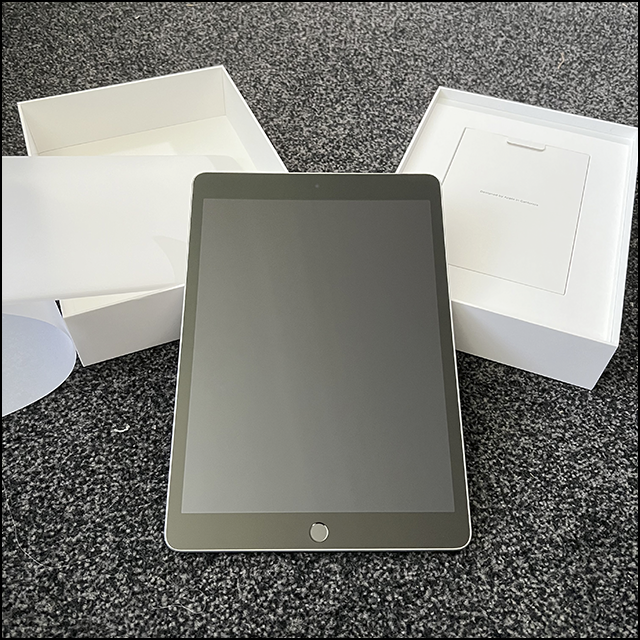
I now have a new iPad (pictured during unboxing yesterday) to replace my iPad Air from 2013, which was struggling more and more with Apps (and speed…), and no longer received iPad OS updates (I’ll come back to that). I got a 2021 (9th Generation) 256GB wifi silver one (I only use my iPad at home or places with wifi, so the cellular option—and the added cost—wasn’t necessary).

I realised as much as a year ago that my iPad was going slow on some new Apps, and in recent months, there were some it wouldn’t open correctly—or even at all. Over the past year, I’ve been modernising my tech so I’ll be sorted for a few years, and this was the last thing to upgrade. I figured a new iPad might last me nearly a decade, too—now I understand what a bad idea that is.

Apple makes it really easy to transfer settings, Apps, etc., to a new similar device if the two devices are close to each other and have Bluetooth turned on. I easily transferred my basic settings—Apple ID, home wifi settings, that sort of thing—from my Air to the new iPad—and then I hit a major problem.

It turns out that to transfer Apps and their data, the original iPad has to be running iPadOS 14 or above: The iPad Air runs 12.5.5. Next option was to restore from an iCloud backup, but I stopped those because I kept running out of space (I later upgraded iCloud). I could, it said, back it up to a desktop Mac using iTunes—which was discontinued years ago. No problem, I thought, I could do a manual local backup using the desktop App for Apple Music, the same way I make a manual backup of my phone. The Air wouldn’t load (I even tried different cables, “just in case”).

I thought about checking an old MacBook I have to see if it still had iTunes, but I thought it’d be easier just to do an iCloud backup of the old one, then have the new one access that. Easy?

It took a few attempts, and more than an hour, to get the backup (it was from scratch, of course). Then there were issues getting the new iPad to download everything from the backup. By around midnight, only a few Apps were downloaded, and most were grayed out with “Waiting…” underneath. I went to bed.

This morning, everything seemed to be there—and 35 Apps needed updates, but they were at least there (some of those updates are necessary because the new iPad is running the current OS). Later in the day, that number expanded to 75 Apps needing updating (they’re all up-to-date now).

The moral of the story is that waiting nearly a decade to upgrade a piece of technology is probably not a good idea, particularly when it’s part of a closed ecosystem. However, I only had the iPad for around four years: It was Nigel’s, and he gave it to me because he didn’t use it, and it was better than the one I had at the time (Second Gen, I think it was—it had also been Nigel’s, as was the one before that, which is now in a box).

Over the past year, I’ve replaced all of my main devices: Desktop Mac, phone, and tablet (I replaced my MacBook in 2019). The iPad is also the first brand-new one I’ve ever had.

I now realise that if I’m lucky, I might get five years out of any of those devices, maybe. However, as the Right to Repair movement gains speed (along with regulations mandating it), it may become easier to upgrade in the years ahead. Maybe.

I obviously haven’t had much of a chance to use the new iPad yet, but I’ve definitely noticed how much more quick and responsive it is—and how much lighter. But getting to this point was definitely a much bigger job than I anticipated.

Still, I’m glad that final tech thing is now taken care of, and I can relax for a few years—I hope.

This is a revised and extended version of something I posted to my personal Facebook this morning.

Sunday, January 16, 2022

I phone like a pro

Yesterday, I talked a bit about the flow-on effects waiting for my new phone to be delivered. What I didn’t talk about was why I ordered the new phone, and why that one. I’ve always talked about my new phones in the past, so today I’ll continue with that tradition.

I used to struggle with talking about new technology I acquired, what and how much I should say about it. I didn’t want to seem to be bragging, and I was always very aware of how fortunate I was was to be privileged so I could have the new technology at all. My thinking has changed a lot over the years, not about how fortunate I am, but, rather, that I have every right to talk about my life just as anyone else does. I’ve become hyper-aware of how short life is, and I don’t intend to waste time second-guessing myself.

This all first came up when I got my iPhone 5c in 2013, my first brand new iPhone (my previous two were hand-me-ups from Nigel). I was also pretty sure that the 5c was my first new phone of any kind since 2005.

I had that phone for nearly four years, up until Nigel got me the iPhone 6 in 2017. That phone was a major step up for me—twice the storage space as my 5c (from 16GB to 32GB), which mattered because I was always running out of space on my 5c, something Nigel was well aware of, and part of his motivator.

Nigel bought an iPhone 6 for himself some months earlier, and after about a year the battery died, a flaw that the 6 was notorious for, and bought himself an 8 not long after I got my new phone. He chose that one specifically because it was the last model with an actual home button (starting with the 9, the button was a virtual one on the glass screen). I still have that phone, and it’s still connected to what was his phone number (now mine), but I may not necessarily keep either.

My own iPhone 6’s battery died some months after Nigel did, and I kind of panicked. I felt that I desperately needed a phone with my own number on, but I was planning to upgrade to the new iPhone because it could use dual SIMs, meaning I could have both phone numbers on one handset. I don’t remember why I hadn’t bought one already (maybe they weren’t available yet), so I actually considered buying a cheap Android phone to tide me over. Instead, I bought an iPhone 7, the cheapest new phone that was still available.

The 7 was a reliable and good phone since 2020, but it wasn’t much advanced from my 6, except that it used fingerprint technology to unlock the phone and to use some Apps that might otherwise demand a password to use. It had the same 32GB storage space as the 6 had—and I was running out of space until I decided to buy additional iCloud space from Apple (which is actually pretty cheap—especially by Apple standards…).

My specific motivator to get a new phone now was that my mother-in-law asked me if I had an old smartphone she could have so that she could use the Covid Tracer App to scan the QR code, which I also talked about yesterday. The stars having aligned, I ordered the new phone—eventually. It still took me weeks to do.

Originally I dithered between the cheaper iPhone 12, then the 13, and the 13 Pro. I finally chose the latter because it was the top of the line, but cheaper than the 13 Pro Max, which is physically bigger. I didn’t feel I needed the Pro Max because the screen of the Pro was already bigger than my 7’s (as shown in the photo at the bottom of this post). I wanted the Pro mostly for the cameras, the best yet in an iPhone, and better than the regular 13’s. My hope is that by getting the top of the line now, I should be able to use the phone for several years. We’ll see.

So far, I really like the phone, but it’s taken some getting used to. It uses facial recognition to unlock the phone, and at first it had trouble recognising me if I was wearing reading glasses. It now seldom has any trouble, but sometimes I need to move my head a bit, and that works. It can’t recognise me if I’m wearing sunglasses or a face mask (both of which makes sense), so in those cases I can use my unlock code instead (useful when I’m outside a shop and needing to scan the Covid Tracer QR code before I enter (especially because I have to continue to wear my mask once inside).

The way it operates is also different, mainly because it uses the newest version of iOS, and it’s different from what I was using, not the least because my old phone had the home button, which has been gone for years. I’ll adapt.

I haven’t had much chance to use it to take photos yet, apart from the selfie with yesterday’s post—something I had to flip manually before posting to the blog because the new phone was set-up to take front camera (on the screen side) photos backwards, like a mirror, and I had to Google how to fix that.

And that’s my new phone story, based on everything that’s come before. I’ve once again been fortunate to be able to upgrade my phone, and I like it. The only honest thing to do, I think, was to acknowledge both.


In this photo (taken with my elderly iPad), it's pretty obvious that the screen on the iPhone 13 Pro (left) is significantly larger than the on my old iPhone 7 (right), despite the phone itself not being much bigger physically. They did that by, among other things, removing the home button (in the black bar at the bottom of the 7's screen), and by introducing the infamous "notch" at the top for the camera and other stuff, all of which had been in the big black part at the top of the 7. Because my lock screen photo had to be scaled up to fill the depth of the new screen, it was cropped on the sides for the 13. The photo up top is of the partially unboxed 13 Pro, taken with my 7.

Saturday, January 15, 2022

Boosted and busy

I had my Covid booster shot this week, and while that went well on the day, it had been delayed by things I had to do, and then there were some issues afterward. In other words, it’s been pretty typical of how things have gone recently.

I seem to use up nearly all my available time lately, and considering that time in a day is one thing I ordinarily have plenty of, that’s a pretty big deal. As I said recently, most of my days lately left me feeling like I was spinning my wheels, and that certainly continued into this week.

The main frustration from the middle of last week on into this week was that I was waiting for a delivery. I’d ordered an iPhone 13 Pro from Apple on Sunday, January 2, and a couple days later I got an email telling me the order had shipped and would arrive on January 10. The thing is, my previous orders always arrived early, so I assumed this one would, too. What made it so difficult was that the tracking site for the courier, DHL, was pretty useless.

It started out well enough: I knew it had left Sydney late Tuesday evening, January 4, and had arrived in Auckland in the small hours of Wednesday morning. Thursday it said, “Arrived at delivery facility” at “NZ Regional Service Area – New Zealand”, which sounded like that was/could be Hamilton. Less than 15 minutes later, it said, “Forwarded for delivery”. I had absolutely no idea what that meant, but thought it could mean it was out for delivery. It wasn’t.

The next day, Friday, nothing changed until late morning when it again said, “Forwarded for delivery” and that it was at “NZ Regional Service Area – New Zealand”. Maybe there was more than one? At any rate, that was it for the day—and week.

DHL doesn’t deliver on weekends (or, at least, wasn’t paid to), so at 7:42am Monday morning, the status changed to “With delivery courier”. It arrived six hours later, at 1:41pm.

I ended up staying home on Wednesday, Thursday, and Friday because I wasn’t even remotely clear when the phone would be delivered. On Friday, I ordered groceries to be delivered so I could get that taken care of, and my prescriptions were also delivered, so staying home wasn’t a total loss. I’d have left the house if only their tracking system had been just slightly clearer—such as, saying merely what day it was due to be delivered, something that was nowhere on their page. That alone would’ve meant, I could’ve had my booster on Wednesday, Thursday, or Friday.

Even on Monday I still had no clear idea when it’d arrive, so I planned nothing at all, which was because they didn’t give any sort of delivery window (by comparison, the supermarket gives me a three hour window, then texts me on the day with a more precise hour-long window, then again a few minutes before the truck arrives). If DHL had given me even a four-hour window, I might’ve been able to go get my booster jab on Monday, too, though that turned out to be a good thing.

Once the phone arrived, I took my time getting it set up, and didn’t even put the SIM in until shortly before I went to bed. I’m giving my old phone to my mother-in-law to try, since it will enable her to scan the Covid QR code, rather than having to manually sign in (only smartphones have that capability). If she can’t stand it, it won’t matter, since I didn’t buy a new phone for her that I’d then have to try to sell or whatever.

I needed to get a case for the phone, and I planned to go to the mall, Te Awa, to get one on Tuesday, and also planned to see if the Vaccination Centre there was accepting walk-ins for boosters. However, I was invited to my mother-in-law’s place for dinner Tuesday night, and decided against getting jabbed in case I felt extremely tired like I did after the first jab.

Wednesday came, and off I went. The phone case was easy enough to find (and it’s a good one), and the Vaccination Centre was accepting walk-ins, so I was set. I was done with the whole process in only a few minutes—in fact, the 15-minute post-jab waiting time was the longest part (that's when I took the selfie up top). I felt fine all evening, and even went to bed a little early (for me).

The next morning, Thursday, I felt fine. I got up extra early (again, for me…), and was carrying on with my day—until I couldn’t. I explained it on my personal Facebook:
Let me say first, this is actually a GOOD thing, but: It turns out it took around 24 hours for reactions to set in. It started with me being VERY tired and sleepy, like I was after my first jab, but this time I didn’t feel better after sleeping (dozing, actually; I couldn’t settle for a good sleep). By late afternoon, a little while ago, I realised I was also feeling pretty crappy (kinda flu-like), so I took a couple paracetamol, which hasn’t taken effect yet. I definitely feel worse now than I did after either main dose—or both combined.

This is, of course, a very good thing because it means my immune system is responding and building its fortress to keep Rona Omicron OUT. But if I feel this yucky as my body builds its defences, I can only imagine how awful it could’ve been if I’d never been vaccinated!!!

So, I might be feeling yucky at the moment, but it makes me happy to know my body is working hard to build defences to protect me from the people who don’t care about keeping others or themselves safe.
As it happens, I did start to feel better when the paracetamol took effect, and I didn’t need another dose. My arm felt less sore, too. Once again, I went to bed early (for me…).

When I woke up yesterday morning, I again felt fine, and my arm was no longer sore. I was guarded, though, and went ahead and mowed the lawns. Aside from getting hot in the late morning heat, it went well. I said on Facebook:
For those following along at home, I feel fine today—and more than 48 hours after the booster, I now feel safe saying that. In fact, I mowed my "lawns" today, and that closed the Exercise Ring on my watch, so I'm clearly doing fine.
I’ve seen other people who had a reaction to the booster the day after they got it, so I wasn’t surprised or worried or whatever. Really, I was just a bit annoyed.

All that disruption caused by waiting for deliveries meant that other things got pushed out, too. Then Thursday, despite its early start, became a total write-off when the reaction set in. I’m now quite a bit behind on various projects, including several blog posts I’d planned to publish my now—they haven’t even been written yet, which is an indication of how behind schedule (so-called) I am right now. Not that it matters, really, but that, too, left me feeling a bit annoyed.

Still, the disruptions of the past week and a half are now over, so most things should get back to normal. However, I know that parts of this coming week will be very busy, so I’m assuming nothing. I do hope I’ll have the time and energy to blog about it, though.

Saturday, October 09, 2021

Open, says me

A miracle happened this week —well, two actually. Well, three, all up. And I was relieved by all three.

First, those Torx screwdrivers I ordered that were delayed? They arrived Tuesday, a day earlier than promised, and six days earlier than the revised delivery estimate. One miracle will take a bit of explanation.

The Torx screwdrivers arrived, much to my surprise, and that’s not just because all the talk of delays turned out to be irrelevant, but also because of the way they were shipped: The drivers were in the wall rack they came with, but were otherwise loose in a what appeared to be a retail box, with two tape circles holding the lid closed: The product was just loose in the box. It’s a miracle that the box didn’t open in transit—though that’s not the last big miracle.

The finally opened Mac Classic.
On Tuesday afternoon, I used the Torx screwdriver to finally open the case of the Mac Classic and: The battery did NOT explode and destroy the logic board! That was so common among on Macs of that vintage that it’s what I actually expected to see. It means that whatever’s wrong with it may be repairable. Whether I, personally, even can repair it is another matter entirely. Another big miracle may be required.

To recap for a moment, I needed a special long-handled Torx screwdriver because two of the screws were in the recess for the carry handle (in the shadow at the top of the photo above) and I couldn’t find such screwdrivers here in New Zealand. I ordered them from Amazon, was told they were delayed, they arrived early, and I immediately used the new Torx screwdriver to open the case, and then found that there was no catastrophic damage, like I thought there might be. So, even though it seems like nothing much happened, this was actually a big step forward.

And that’s a bit of a miracle, too.

The screws after removal. The black one on the left is from the bottom of the back of the case, which can be seen, so they're black to match the various ports. The upper screws can't be seen, so they're just ordinary screws (and have looser threads), and un-coloured screws are usually cheaper. But making sure that visible screws match nearby ports is the sort of attention to detail that Apple was once famous for.


Thursday, September 23, 2021

Slower than I thought

Progress is progress, right? Well, Ye Olde Macintosh Project (YOMP) has moved even slower than I expected. Which doesn’t mean that nothing’s happened, just that not much has happened. Which makes a short post all the more possible, for a change.

in my first post on the project, I talked about some of the things I needed in order to be able to get the Mac Classic working. There are updates on two of those.

I said I needed a long-handled Torx screwdriver, and I thought that Nigel might have some. I haven’t found any, and I’ve since realised that what I pictured in my head were probably hex drives because they were used for the machines that Nigel built, like his CNC router and his (many) 3D printers. Torx are kind of a specialty thing in computers, and I can’t think of a reason he’d have needed one.

So, I started searching for them in New Zealand, but true long-handled Torx screwdrivers weren’t available here. I bought an ordinary one from the home centre, even though I was pretty sure it wouldn’t work for the two screws that need the long-handled screwdriver, and I was right (though it did work for the other two, not that it helped anything with two than couldn’t be reached).

It was back to the search, and I finally relented and went to order a set from a New Zealand site that imports them from the UK, only to find they were out of stock. I surrendered: I ordered a set from Amazon, and they should be here on October 6, give or take. Oh, well, I tried to buy in New Zealand. As I learned from watching Nigel, it’s all too often impossible to source specialised tech stuff in New Zealand, and now it’s even worse because of all the Covid-related disruptions.

Another thing I mentioned was that I needed a keyboard and mouse that could connect to Macs of that era (they use a standard called “ADB”). I also said that the only place I found vintage keyboards was in the USA where prices could be many hundreds of dollars. Then, my luck changed.

Someone put an ADB keyboard on the New Zealand auction site, Trade Me. It was from Power Computing, which I knew had manufactured “Mac Clones” in the mid-1990s (until Steve Jobs returned to Apple and killed off the clones market, acquiring Power Computing’s assets). I knew it was a Mac keyboard from that alone (the listing didn’t say), but it had a photo of the connector, which I could see was ADB (because of the number of pins and their configuration), plus the key combinations to the left and right of the spacebar (I used one every day for years, after all). The asking price was $15 (!).

I was all set to bid on it in the last few minutes of the auction—and then I forgot to go there and the auction closed with no bids. I sent a message to ask the person to relist it. Then I got an email from Trade Me touting various auctions, as it does, and one of them was for the same sort of keyboard from the same person, but not as yellowed (a topic in itself). Another lucky break! I got that one (photo up top) for $15, plus $10 for shipping (it was in Auckland, and I couldn’t go there to pick it up due to Covid restrictions). It took six days to get to me because of local shipping delays (apparently caused by people buying lots of stuff online during the Covid lockdowns).

I was sure that the delay didn’t matter, because without the Torx screwdriver, I can’t open the Mac Classic to see why it won’t boot (I’m betting the logic board is munted). Nevertheless, I hooked up the keyboard (after giving it the first clean it’s getting), and, as I suspected, nothing happened. Back to waiting for the screwdrivers.

A keyboard alone isn’t enough: I’ll need an ADB mouse, too. I keep having visions that I still have an ADB mouse packed away, but I don't know if I do or if it's a displaced memory or something. I looked through some old boxes where I thought it might be, but so far nothing. I did, however, find the AC power adapter for my Zip drive that I brought from the USA (once here, I had to get one that would work in New Zealand), and also the US power cord for my old Mac Performa 637 that I brought from the USA. If I kept those, then the mouse, if I do have it, will be packed away somewhere—and so, too, there may be some SCSI hard drives I had back then, too. After all, I still have the modem I brought with me.

Meanwhile, in my first YOMP update post, I talked about not being able to access old diskettes. I said that “somehow getting access to a working vintage Macintosh” was an option if I can’t get the Mac Classic working. The jury’s still out on whether that Mac Classic will work or not, but I made progress on the back-up option, something I’ll talk about in a few weeks (those same Covid restrictions are delaying the completion of this mysterious development). But I think it’ll be a good development.

So far, though, that’s all that’s happened—or not, depending on your point of view. And there’s much more yet to come—or not. For me, the not knowing is part of the fun of the whole thing.

Thursday, September 02, 2021

Ye Olde Macintosh Project – an update

Among my many (many, many…) projects are ones on which progress is extremely slow. It’s now clear that the slowest of all may be the project to get a 1990 Macintosh Classic running again, something I talked about in quite some detail this past Sunday. In the interest of brevity, I’m going to do some shorter posts updating progress rather than long ones with lots of details. Besides, this blog is often sort of a repository for things I otherwise would forget, and I find it helpful to have complete information about my projects.

The first thing I’ve done is give this project a nickname—of course I have: I give nearly everything that’s not serious a nickname. So, this project is now Ye Olde Macintosh Project, or YOMP for short. Because, why not?

This week I made further attempts to access my oldest floppy disks—after finding six more of the more “modern” ones. I said on Sunday that I ordered a new USB floppy drive that could read 720K floppies. That arrived yesterday, and no, it couldn’t read my old DS/DD floppies, either. I now realise why: Both the USB floppy drives were designed for PCs, not Macs.

The problem here goes back to the dawn of the double-sided floppy disk era, the mid 1980s. The original DS/DD disks were designed to hold 720K, however, the clever engineers at Apple worked out that they could get the capacity up to 800K (which was quite a lot in those days!) if they varied the speed the floppy spun at depending on the location of the read/write head of the drive. That never became a standard for PCs, and so, floppy drives intended for PCs can’t read 800K disks because the disk rotates at a constant speed.

Apple dropped floppy drives from their machines in 1998, with the release of the G3 iMac. Then, in 2019, they dropped support for floppies in the MacOS, too. All of which means that there are NO new USB floppy drives that can read 800K disks (something I should have researched before I bought the new drive, but, never mind).

All of which means that my options for those old floppies are quite limited. First, I could get the Mac Classic running. Second, I might be able to find a vintage external Apple floppy drive that’s affordable (not easy). Or, third, maybe I could find a munted vintage Macintosh that I could salvage the SuperDrive from. That last option’s the most problematic one by far because it would mean adapting it to work connected to a modern machine, and that’s way beyond my capabilities—if it’s even possible.

So, accessing those old 800K diskettes—which is a side project related to, but not actually part of YOMP—is now on hold until I find out if the Mac Classic is salvageable. If it isn’t, I’ll explore other options.

Meanwhile, the Zip Disk project (also a side project related to, but not actually part of YOMP) has had only negative progress: I’ve now confirmed that none of my PC computers have a serial port. The only thing left to try is to hook it up by USB to a PC, but I have my doubts that will work due to formatting differences. I looked for used USB Zip Drives and, well! If I thought the old ADB keyboards and the old Apple external floppy drives were expensive, I didn’t know what I was talking about: I saw prices as high as $3000 (!), with most in the high hundreds, and all with maybe another US$125+ on top of that for shipping. I think I need a lie down with a cool cloth for my forehead…

All up, getting the Mac Classic to work, or at least somehow getting access to a working vintage Macintosh, would be my best option for accessing all of those now vintage disks. Can’t speculate about the latter, of course, but the former will need more time.

My next step is to go back into my garage project and set up my workbenches so I have somewhere to work on the Mac. In addition to clearing space for the workbenches, I also need to find the bolts for the legs. I found them right after I moved in here—maybe even the very day I moved in—and I put them somewhere “safe”. The rest is predictable.

Still, even though none of this has actually moved forward, it at least keeps me busy, with no time to get bored. That’s especially good while we’re living in Covid Alert Level 3 and I can’t really go anywhere, anyway.

Now, back to work!

Sunday, August 29, 2021

It’s my new project, Mac

If I’ve learned anything about managing my various projects over the years, it’s that it’s always good to have several non-important ones on the list. That way, when progress on important projects gets stalled, I can still have other projects to turn to. Idle hands, and all that. However, my latest non-urgent project takes that to a whole new level—breaking me into new and completely foreign territory populated with many new challenges and the chance to learn totally new skills. Or, it could all end badly. It should be clear which way it’s headed within a few weeks, when the project itself may end. Or, it may go on for ages. The not-knowing is part of the excitement.

I recently bought an old Macintosh Classic (manufactured in 1990) on NZ’s online auction site. I paid $63 for it (today, that’s about US$44) as is—no keyboard or mouse or power cord, and no promises it would work. If that seems like a weird thing to buy, I have my reasons.

It all started when I found an old “get started” disk for the “America Online” Internet service (I forgot to share that Instagram post here; oops). The box it was in also had “dozens (…and dozens) of floppy disks”, as I put it on my personal Facebook at the time. I knew I had a USB external floppy disk dive, so it should’ve been easy to check them, right? That’s not how technology usually works.

So far, I’ve found a total of 154 floppy disks, all but three of which I’ve checked. And that right there is where it first got complicated.

I plugged the floppy drive into my current Mac Mini, but it couldn’t read any disks. A little Googling told me that in October 2019, Apple eliminated support for the floppy disk file indexing system called HFS (Hierarchical File System) when they released their 2019 MacOS, Catalina. My new Mac Mini couldn’t read the floppies—but I thought my old MacBook Pro probably could.

That old MacBook still has an older (pre-2019) operating system, so it could read most of the floppies—but there were 45 it couldn’t read. Those disks were “double-sided, double-density” (also known as DS/DD or just DD), and they were the oldest of my floppies and, based on the labels on them, hold some of my oldest files. Those disks hold stuff that doesn’t exist anywhere else, including stuff from my activist days. I had those disks because in those days I was sometimes renting time using the Macintoshes of the day, and they often could only use the DS/DD diskettes. NOW I wish I’d copied the files to HD diskettes, but it never occurred to me back then.

I suspect, but don’t know, that the USB floppy drive Nigel had can only read the more “modern” HD floppy disk format. I couldn’t find any model number on the drive, and my attempts to find out through searching online didn’t solve the matter—but it seems the most likely explanation.

Next, I decided to try to access a bunch of disks that look like floppy disks on steroids: Zip Disks, something like mini-removable hard drives used in the peripheral Zip Drive. I have ten 100MB Zip disks, and I think the emails that Nigel and I sent to each other before I moved to New Zealand may be on those disks, along with other lost files.

The drive I have is a SCSI (Small Computer System Interface) device (SCSI is similar to a serial interface on a PC). I bought a cable that connects it to a USB port, however, it’s a straight pass-through cable, not an adapter, and it won’t necessarily make a modern computer able to access a SCSI device. None of my Macs can access it.

All of which means that I could access some of my files, those on HD floppy disks, but nothing else. I needed new options.

The wisdom of the Internet told me that a Linux machine might be able to read the Zip disks. Nigel turned our oldest MacBook (the white plastic kind) into a Linux machine, but it couldn’t access the Zip disks (or the DS/DD disks, which again suggests the drive can’t read them). Other advice suggested hooking it up to a PC running WindowsXP, but there are potential file formatting issues, and, anyway, I only run that on my old Hackintosh through emulation, and it doesn’t have a serial port. A dead end.

That’s where the Macintosh Classic came into the picture: It has an Apple Superdrive, the floppy drive they introduced in the late 1980s to read and write both DS/DD and HD diskettes. It also has SCSI—all of which would be useful.

The day the Mac arrived by courier, I grabbed a power cord and plugged it in to see if it turned on (photo above—the fire extinguisher in the background was because I figured it was best to play it safe). It seemed like absolutely nothing happened when I turned it on—the screen remained off, there was no sound of a hard drive spinning up, but then I heard the soft whirring of what I think is the cooling fan. This isn’t necessarily bad news.

There could be lots of different things going on, but I won't know anything for sure until I can open it up. I need a very long-handled T-15 screwdriver, a particular size of a Torx screwdriver with a very long handle. I have heads for that, but nothing with a long-enough handle. I'm pretty sure Nigel would've had one, but, I'm not entirely sure where it'd be (though I have ideas…). If I do need to buy one, I can't get it at Covid Alert Level 4, so there's nothing more I can do right now.

Once I open up the case, I may find that the battery exploded (a common thing, apparently) and damaged the logic board. If that happened, it may be irreparable, or, if it can be fixed, it’d be way beyond my capabilities. Another common problem, probably unrelated to the failure to start up, is that capacitors may have leaked, and they sometimes can be replaced—something I also don’t know how to do (assuming I could even get the right capacitors). Once I know what I’m facing, then I’ll see what things I’d need to learn to do, if possible.

As Steve Jobs might put it, “there’s one more thing”: Macs of that era used something called ADB (Apple Desktop Bus) to connect the keyboard and mouse. Those devices disappeared when USB was introduced, so now the only place to get them is from an online auction site (usually in the USA), and they often go for crazy prices (I’ve seen some keyboards going for more than US$200, which today is about NZ$285). I found a place that makes a true adapter (not just a cable) to connect a corded USB keyboard and mouse to the ADB port on the Mac, and it’s cheaper than many vintage keyboards. Still, no point doing anything about that until I know if the Mac can be saved/repaired.

If all else fails and I can’t get it working, it'll be a nostalgic object for me because it's basically the Mac Plus in new clothes, and the Mac Plus was the very first Mac I ever used—AND I used to do page layouts on the thing, but from here in the 21st Century, I have absolutely no idea how I ever did that. On the other, I saw a video by a guy who took out all the guts of a dead Mac Classic, mounted a modern LED screen where the old CRT monitor was, and put an older Mac Mini inside the case. It's—an option, I guess.

Meanwhile, I have other things to try. For example, I could try to find a used USB Zip Drive, which my old MacBook should be able to access. I also ordered a new USB floppy disk drive that can read both formats of floppy disk. That’ll arrive in a few days. In other words, I’m hedging my bets.

All of this is something I did because progress on my important projects has been stalled by the Level 4 Lockdown. I won’t have any room to move in my garage until I can get those 80 now-flattened boxes out of the way (something I’d planned to deal with the day we moved to Level 4). The horrible weather we’ve had lately (cold and lots of rain) has also meant I couldn’t do any of the preparatory work in the gardens. So, it was really good to have this multi-faceted technical project to work on, especially because so far it’s all cost me less that $100, which is pretty inexpensive as hobbies go.

There’s nothing in all this so far that’s new to me: I’ve been using Macintosh systems since the 1980s, so I’m very familiar with how they worked then as well as now. Even so, there’s plenty of stuff for me to learn, and maybe even a new skill or two to pick up. Most importantly, I enjoy it—even the incomplete successes.

To quote Steve Jobs yet again, there’s one more thing: All of these projects I talk about now have one thing in common: They’re all about me—what I want to do, what interests me, and how I want to arrange my life. Very few of my projects now are actually about Nigel, though the security alarm project was one he never got to. But even that was about what I wanted, and it’s part of the changes I’m making to things that were Nigel’s projects as I move to things that work better for me. I carry all the stuff I learned from Nigel, even from just watching him, but now it’s me taking charge of everything, willingly and on purpose.

It turns out, I’m my own biggest project of all, and so far that’s progressing well.

More on the Mac Classic: It was available October 1990 to September 1992 (the fact that the one I bought was manufactured in September 1990 means it’s among the original machines made). It has a Motorola 68000 8MHz processor, and the OS it could run was System 6.06 up to System 7.5.5. They usually had a 40MB hard drive, and had 1MB built-in memory, with a 4 MB maximum (!). They also had a 9-inch (23cm) monochrome CRT monitor, and that SuperDrive I mentioned. It originally cost US$999 to US$1500, and was the first Mac to cost less than US$1000. In today’s money, adjusted for inflation, that would be about US$2,087 to US$3,133 respectively (which would be NZ$2976 to NZ$4469 in today’s dollars; NZ inflation rates may not match the USA’s, and I don’t know the original list price here in NZ, so those amounts are indicative only). Modern Macintoshes are definitely a LOT more affordable now.

Sunday, June 20, 2021

Things get wrecked

Anyone who’s ever had a furbaby knows that things will get damaged or destroyed. Sometimes it’s on purpose, like Leo’s most recent toy rampage, and other times it’s accidental. I now have an example of the latter, something that also points to a larger problem.

Friday night, Leo was playing with his toy ball next to my chair. I didn’t think anything of it, since he’s done it before, until I looked down: I could see the charging cable I use for my iPad (sometimes my phone) was broken (photo up top). Because Leo’s hasn’t chewed on any cables since he was a puppy, my best guess is that Leo accidentally broke it while he was playing, either by forcefully pawing at the ball (he does that all the time), or maybe trying to pick up the ball in his mouth and getting the cable caught. At the very least, I’m sure it wasn’t deliberate.

The thing is, this isn’t the first time I’ve had trouble with such cables, no furbabies required.

I got out the cable I used for a couple years or so, but the end that plugs into my device is breaking where it bends at the connection, so I taped it up tor reinforce it until I can replace it:


These cables are notorious for their relatively short lives: The end points of the cables, especially where it plugs into a device, have always been weak points that tend to break—and it’s been that way as long as Apple has made mobile devices. You’d think that Apple would’ve come up with something better by now, but, no. To add further insult, Apple charges rather a lot for replacement cables. Fortunately, other companies make the cables and sell them for lower prices (so far, I’ve only bought one cable that turned out to not be compatible with Apple products).

In August last year, the cable I was using (and am again…) started looking as if it was going to break soon, so that’s when I decided to replace it. I ordered one from an Australian seller (because the genuine Apple ones I found in NZ were twice the price). The cable, the seller said, was made in the same factory as Apple’s own cables, and it was certified compatible. It worked flawlessly, and seemed to be similar quality to Apple cables—which means that it was just as likely to break.

These cables can’t be repaired: The ends are moulded onto the wires, and those wires are extremely fine gauge. Throwaway society, in other words.

I knew that there were cables that were reinforced in various ways, and that’s what I decided to replace my cable with. Here are two different approaches (brand names removed because the point isn’t the specific cables):

The cable on the left has aluminium mesh protecting the cable (I don’t think Leo could bite through it…), and the ends are somewhat more robustly designed than Apple’s (or similar), but it’s still a potential weak spot. The cable on the right is nylon mesh (like rope), but has stronger moulded connections, a bit like a cord used by something that might be plugged-in and unplugged many times, like a table lamp, might have. Since my main problem has been with the end where it connects to my device, I’m going to try the one on the right (it’s also available locally, and on special at the moment). However, I could get a three pack of the other one for roughly the same price from that Australian seller, so I may end up getting those, too, so I have better replacements than a cable I taped up.

None of this would be necessary if Apple (and probably other manufacturers) provided better-designed cables. There’s not enough metal in any one dead cable to justify the cost of getting it out, so most of these cables must end up in the rubbish. It’s so unnecessary.

This particular tale is just a snapshot of modern life: A dog playing with a toy, as has happened since forever, accidentally broke a cable that is far, far too easy to break and to wear out. This obviously isn’t a particularly big challenge for me to overcome, but it’s one example among dozens—probably hundreds—of small but incredibly annoying challenges that companies foist upon us because it’s cheaper to make poorly-designed products that we have to replace far too soon, giving them no incentive to produce well-designed products that last.

Things need to change. Things get wrecked all the time, and plenty of times that’s unavoidable. But bad design and companies’ complete lack of concern about promoting a throwaway culture wrecks things, too.

Thursday, March 11, 2021

My two-day mission

Yesterday and today I was occupied with what has to be the most exciting thing that any computer user can be engaged in: Manual backups of files. While it’s tempting to make a joke about what a star I am for having done that, the larger truth is that it was at least somewhat unexpected. And now, it’s also done.

The story begins when I got my new Mac mini. In that post, I explained why I bought the new Mac, and added:
In September of last year, I replaced the window coverings in my office and the spare bedroom, and that meant moving my desk away from the window. Somewhere in all that I managed to break my Hackintosh: It would no longer connect to the monitor. That meant that it was useless, and it also meant I didn’t have a clue how to fix it. [Link in the original]
That was true then, not so much now.

I opened up my Hackintosh case and removed the hard drive in it. My idea was that if I couldn’t start up the old computer, then at least I could retrieve the data on the hard drive, which was the main thing I wanted to do. I knew that I’d added files—and not backed them up—before the Hackintosh stopped working, so I didn’t have them anywhere else.

I knew there had to be an adapter to do what I wanted, and while I knew I’d run across a cable to connect a SATA hard drive to USB, I, first, have no idea where it is, and second—and more importantly—a 3.5 inch hard drive generally needs to be powered for it to work, especially if it’s larger. The drive in question was 4TB.

I found a place that sold them—the same computer store that I went to recently—and then went there and bought it on Monday, along with two new monitor stands (which I still really like, by the way). I brought it home and set it up, plugged in the hard drive, and copied the files onto my server. One slight problem: There were hardly any files on that hard drive.

I realised that there had to be another hard drive in the machine, one that had the operating system, but especially the documents and downloads I was after, and especially the desktop folder. I looked in the case. It had computer stuff in it—but nothing that looked like a hard drive. I put the hard drive I’d copied back into its bay, looked some more, and was just about to give up when I noticed something: There was a second HDMI port near the bottom of the case (I’d always used one near the top of the case to attach my monitor). I figured I had nothing to lose by trying that.

As luck would have it, I’d been tidying stuff and ran across a still-sealed-in-the-bag HDMI cable, which means I knew it was in good condition, with no faults. I hooked it all up and, yes, it started up perfectly. I could see the files I wanted, some on the desktop, some in downloads. I copied them to my file server, then backed them up to a removable external hard drive, too (just in case). Then, I deleted them from my Hackintosh.

All of this took two days to do, mainly because it took a long time to transfer that much data to my server. Actually, even backing it up to that hard drive was painfully slow (it was over ordinary USB). The important thing, though, is that all my files are backed-up—there’s nothing missing (including numerous podcast files that were nowhere else).

This evening I made sure some more obscure files had already been copied (they were). Next, I’ll either need to start deleting Apps on the Hackintosh, or else reformat it into—well, something. I think it has a usable life yet, but I’m not quite sure what to do with it. I may ask my IT people for advice.

Meanwhile, now that all the files I want access to are on the server—united for the first time in many years—I can go through them and delete the duplicates. I’ve had many upgrades and computer changes over the years, including a few years using a Windows PC. The many changes meant duplicating files endlessly, though not the last two times I bought Macs because Apple makes it easy to migrate files from one Mac to another, meaning nothing is left behind (the problem I had was because I added files to the Hackintosh well after I’d, migrated files to my MacBook Pro, which, in turn, I migrated to my new Mac mini).

That’s the story of what I’ve been up to for the past two days (among other things…), but it tells a larger story. I’d never have had the patience to do all this if Nigel was alive: I’d have relied on him to sort it all out. I have to rely on myself now, so I used the methods I saw him use: Research the problem, find solutions, and fix the problem. The fact I was able to start up my old Mac and retrieve the files I wanted is because I also did another thing he’d have done: I observed carefully, and from that worked out what I could try to do.

Nigel would be surprised at all the times over the past 17+ months that I’ve solved technical problems all on my own. He’d be surprised, but also impressed that I’d paid attention to his example, learned from it, and benefited from it. This is a good example of why I say people should model behaviour they would like to see reflected back by others: In this case, I learned from Nigel without him ever teaching me anything, and that’s enabled me to help myself.

If I’m honest, it’s been a trying, sometimes frustrating couple days, but I got there in the end, which is what matters. And now this two-day mission is complete. Time for the next adventure.